The Parts That Make Up a Computer (and What They
Do)
Every fully-functioning computer is made of the same basic
components, and in this section, we’ll walk through the basic hardware you’ll
need for your first build. We’re still just talking about “things to consider”
here—we’ll get down to the nitty-gritty of picking out specific parts in the
next lesson. Here, we just want to point out what the important components are,
and which ones are the most important for certain builds.
The Processor

The Processor (CPU) is the “brain” of your computer, the
thing that carries out the tasks you give it. Better CPUs can perform more
tasks at once, and perform them faster. That said, not everyone actually takes
advantage of their processor’s full speed, so the high-end models are only
really crucial if you’re performing intensive tasks like video editing, video
conversion, compiling code, or (to a lesser extent) gaming. It’s also one of
the most expensive parts of a machine, so if you aren’t performing these types
of tasks, you definitely don’t need to worry about buying the latest and
greatest.
The Motherboard

The motherboard connects all the other components to one another, and is the physical base upon which you build everything else. It contains a lot of your machine’s core features, like the number of USB ports, the number of expansion cards you can put in (such as video, sound, and Wi-Fi), and also partially determines how big your computer will be. Which motherboard you pick will depend on whether you build a low, medium, or high performance machine and how advanced of a user you are.

The Case
The case holds all of your computer’s parts together. For
the most part, a case is less about features that affect how
your computer runs and more about features that affect you and
your home—that is, how quiet it is, how large it is, and of course, how it
looks in your office. Still, it’s an important consideration that is dependent
on your other choices, so you might want to think about what you want in terms
of a case before moving on to the shopping step.
The RAM
The RAM

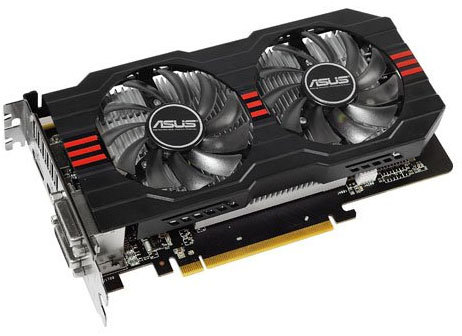
The Graphics card, or GPU, is a processor specifically
designed to handle graphics. It’s what you hook your monitor up to, and it’s
what draws your desktop and your windows on the screen. Some motherboards come
with a GPU already integrated, which is enough to manage your desktop, but
usually not enough for playing 3D games. For those, you’ll need a dedicated
graphics card, since it can do the legwork needed to draw those complex images.
The Hard Drive(s)
The Optical Drive

An optical drive, more commonly known as a CD or DVD
drive, is what you’ll use to read CDs, DVDs, and even Blu-Ray discs. Not
everyone needs an optical drive in their computer these days, but since you can
buy one for about $20, there’s little reason not to have one.

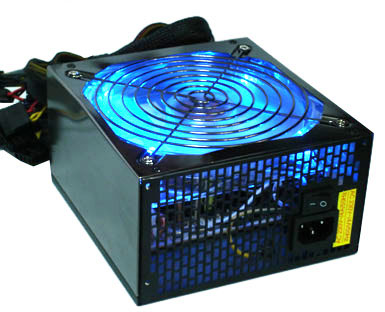
The power supply directs electricity to the other
components in your machine. Generally speaking, if you have a high performance
computer with a fast processor, a graphics card, and a few hard drives, you’ll
need a higher wattage power supply than you would if you were building a
low-end PC. This is probably the last component you’ll shop for, once you’ve
nailed down your other parts and how much electricity they’ll require.
 While these are the main parts almost every computer has,
you probably have other needs. For example, if you’re going to use Wi-Fi to
access the internet instead of wired Ethernet, you may need to buy a Wi-Fi
card. If you take a lot of photos, it’s probably worth getting an internal SD
card reader for easily loading your photos onto your computer. If you have any
Bluetooth peripherals, you might consider an internal Bluetooth card, and if
you video chat with friends, you’ll want to pick up a webcam. And, as we
mentioned before, if you don’t already have them, you’ll need a monitor,
keyboard, and mouse.You may even want some extra fans or water cooling parts
to optimize the
cooling in your PC. These are just a few of the extra things you could use, so
really think about what you’ll be using this computer for and what other parts
you need to buy so you don’t have to take an extra trip to the
store (and so you can better budget your money).
While these are the main parts almost every computer has,
you probably have other needs. For example, if you’re going to use Wi-Fi to
access the internet instead of wired Ethernet, you may need to buy a Wi-Fi
card. If you take a lot of photos, it’s probably worth getting an internal SD
card reader for easily loading your photos onto your computer. If you have any
Bluetooth peripherals, you might consider an internal Bluetooth card, and if
you video chat with friends, you’ll want to pick up a webcam. And, as we
mentioned before, if you don’t already have them, you’ll need a monitor,
keyboard, and mouse.You may even want some extra fans or water cooling parts
to optimize the
cooling in your PC. These are just a few of the extra things you could use, so
really think about what you’ll be using this computer for and what other parts
you need to buy so you don’t have to take an extra trip to the
store (and so you can better budget your money).
Sit back and ponder how you use your current computer, how
you’re going to use your new computer, and what that means for the components
listed above. If you’re going to do a lot of gaming, a high-end processor and
video card are crucial. If you’re building a home theater PC, you’ll want a
“good enough” video card, a low-end processor, and a large hard drive to store
all your movies. Once you’ve figured it out, come back for our next lesson, where we’ll talk about how to actually shop for the parts you need to
build your computer.


No comments:
Post a Comment